
shell
ผู้เยี่ยมชม
benducket3211@gmail.com
Does Your Business Need WordPress Management Software? A Plain-English Guide (6 อ่าน)
13 ต.ค. 2569 17:29
If your business runs more than one WordPress website, someone has to keep them updated, backed up, online and secure.WordPress management software is one way to do that job. Hiring someone, or doing it yourself, are the others. This guide explains what the software actually does, what it does not do, and how to decide which route suits your business.
What WordPress management software is
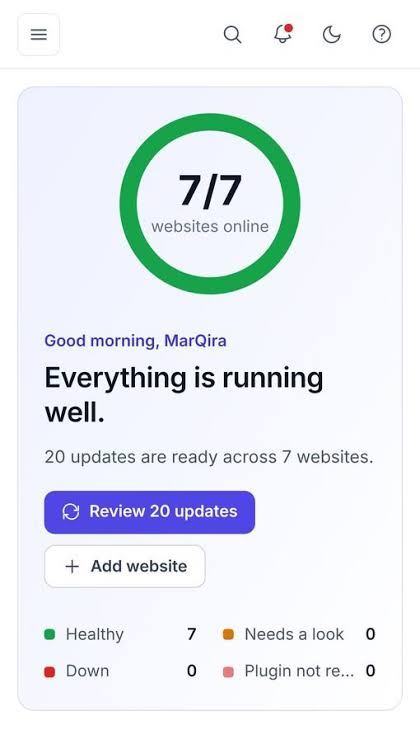
WordPress management software connects to your websites and lets you look after all of them from one place. Instead of logging into each website's admin area, you see every site on one screen and handle the routine work there.
It is not a website builder, and it does not change how your sites look. It looks after the sites you already have.
What it does for you
•Updates. Keeps WordPress, plugins and themes current, which is how security fixes reach your sites. Good software checks the site afterward and can undo a bad update.
•Backups. Keeps copies of each site somewhere safe, so a broken or hacked site can be put back.
•Uptime monitoring. Checks your sites around the clock and alerts you when one goes down.
•Security checks. Warns you about known problems in the plugins your sites use.
•Access control. Lets each staff member or contractor sign in with their own access, which you can remove in one step.
•Reports. Gives you a plain summary of what was done, so the work is visible.
What it does not do
Being clear about this avoids disappointment. Management software does not write your content, redesign your site, plan your SEO or fix custom code a developer wrote. It keeps the site healthy and tells you when something needs a person. For anything beyond that, you still need a human.
Your three options, compared
These are not either-or. Many agencies use management software to deliver their WordPress care plans, so you may already benefit from it through a provider.
Five questions to help you decide
1.How many sites do you run? Withone site, doing it yourself is reasonable. From three or four, a single dashboard starts to save real time.
2.Who updates them today? If the honest answer is "nobody, regularly", that is your biggest risk.
3.What does an hour of downtime cost you? For a shop or a booking site, the answer decides how much monitoring and safety you need.
4.Is there someone who can spend an hour a week on it? Software works best when a named person owns the routine.
5.Who has your admin passwords? If you are not sure, start with access control.
What to look for if you choose software
•Updates that are checked afterward and rolled back if something breaks.
•Backups you can actually restore, kept away from your web server.
•Monitoring that checks often and from more than one place.
•Individual logins for every person, and a record of who did what.
•Clear pricing, with the important features included.
As one example, WPCentrify is WordPress management software built for business owners, freelancers and agencies. It works with any self-hosted WordPress site on any host and includes safe updates with automatic rollback, backups with restore, uptime checks from three locations and individual access. It is free during early access.
Getting started in one week
6.Day 1: List every website, where it is hosted and who has access.
7.Day 2: Make sure each site has a backup stored off the server.
8.Day 3: Turn on uptime monitoring for every site.
9.Day 4: Replace shared passwords with individual access.
10.Day 5: Apply pending updates on your least important site first, then the rest.
Common questions
Is WordPress management software only for agencies?
No. Agencies use it to look after client sites, but it is just as useful for a business with several brand sites, a group of local branches or an online shop alongside a company site. The work is the same: updates, backups, monitoring and access.
Will it slow down my websites?
A well-built tool uses a small connector plugin and does most of its work on its own servers. Uptime checks are ordinary page requests, a tiny fraction of normal traffic.
Do I need technical skills to use it?
You need to be comfortable logging in and reading an alert, not writing code. If something breaks beyond what the software can roll back, that is the point to call a developer.
Is it safe to give software access to all my sites?
It is a fair question. Read the vendor's security page, check how the connection is protected and whether you can remove access in one step. Then start with your least important site.
43.242.176.96
shell
ผู้เยี่ยมชม
benducket3211@gmail.com